

Contents
- Arduino Nano 33 BLE Sense搭載センサとPDHのBLE通信
- 1. 概要
- 1.1. BLE通信の概要
- 1.2. BLEのサービスと特性の概要
- 1.3. BLEの通信手順
- 1.4.UUIDとは何か
- 1.5. 送信するセンサデータ
- 2. BLE送受信システム
- 2.1. ArduinoのBLEライブラリ
- 2.2. PDHのBLEライブラリ
- 3. Arduino Nano 33 BLE SenseのBLEプログラム
- 3.1. 9軸センサLSM9DS1のプログラム
- 1)概要
- 2)プログラムの説明
- 3. PDH Python3のBLE受信プログラム
- 3.1.必要なライブラリのインストール
- 3.2.プログラムの概要説明
- 3.3.プログラムの動作説明
- 3.3.1. BLEの受信動作
- 3.3.2. MQTTのパブリッシング動作
- 4. Node-REDのフロー
- Appedndix1. ArduinoBLEのCharacteristics
- Appendix2. Arduino Nano 33 BLE Senseのサンプルプログラム
- ■ メインタブ:pre-nano33BLE.ino
- ■サブタブ: update_LSM9DS1.ino
- Appendix3. PDH用Python3のBLE受信プログラム
- Appendix4. Node-REDフロー
- Appendix5. 4つのセンサのデータの送信プログラム(Arduino)
- Appendix6. 4つのセンサのdエータの受信プログラム(Python)
Arduino Nano 33 BLE Sense搭載センサとPDHのBLE通信
1. 概要
ここでは、Arduino Nano 33 BLE Senseに搭載されているセンサの出力をBLE(Bluetooth Low Energy)のNotifyにより、PDHに通信する方法をまとめます。
1.1. BLE通信の概要
BLEは、低データレートでの低消費電力使用に最適化されています。BLEでは、センサのデータを取得し送信する周辺機器(Peripheral Device)と周辺機器のデータを読み取るセントラル機器(Central Device)の間でデータのやり取りを行います。Arduino Nano 33 BLE Senseは、周辺機器して動作します。そしてPDHがセントラル機器です。
1.2. BLEのサービスと特性の概要
周辺機器によって提示される情報は、サービス(Service)として構成され、各サービスは特性(Characteristics)に細分化されます。サービスと特性には、UUID(Universally Unique Identifier)と呼ばれるユニークな番号が付与されています。セントラル機器は、周辺機器のサービスと特性のUUIDを指定して情報を取得します。
特性には、Read、Writeの他にNotifyとIndicateという機能があります。Notifyは、周辺機器がデータを準備できたタイミングで送信する機能です。Indicateは、Notifyで受信した際にセントラル機器が確認応答を送信する仕様です。
1.3. BLEの通信手順
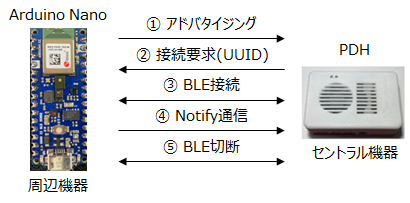
周辺機器は、アドバタイジング(Advertising)によって他のデバイスにその存在を知らせます。アドバタイジングのパケットには、デバイス名、提供するサービスのリストなどを含めることができます。セントラル機器は、アドバタイジングされた情報をもとに、利用するサービス、特性のUUIDを使って周辺機器にアクセスします。
1.4.UUIDとは何か
UUID(Universally Unique Identifier)とは、ソフトウェア上でオブジェクトを一意に識別するための識別子であり、機器のサービスや特性によって異なるUUIDが使用されます。UUIDは、MACアドレスなどから作られる一意のデータです。
UUIDのフォーマットは、16進数の文字列とハイフンからなる文字列です。例えば、以下の様な文字列です。
9997c270-9b20-4181-808f-ef2de31032a8
データ長は、128bitの数値で、Byteでいうと16Byte、ハイフンを除いて32文字です。
また、BLEのUUIDが、以下のように短縮形で書かれている場合もあります。
2a19
Bluetooth SIGという団体にて標準で定義されているUUIDに限り、2Byte(4文字)で表現することが許されています。この2Byte以外は全て共通のデータ値であり、省略しても良いことになっています。
詳しく書くと、下記のX以外の文字列が省略された共通データ値です。
0000XXXX-0000-1000-8000-00805f9b34fb
UUIDは誰でも簡単に作れます。
Linuxでは、ターミナルに以下のコマンドを入力します。
$ uuidgen

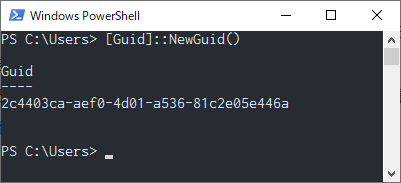
Windowsの場合は、PowerShellで以下のコマンドを入力します。
[Guid]::NewGuid()
また、Webからでも作れます。
https://www.uuidgenerator.net/
1.5. 送信するセンサデータ
Arduino Nano 33 BLE SenseをBLEの周辺機器として、サービスと特性(Characteristics)のUUIDを以下の様にします。
ここでのUUIDは、サンプルプログラムに使用しているUUIDです。機器が異なりますので、各自のUUIDに変更して使用して下さい。
UUIDに関しては、「1.4. UUIDとは何か」を参照ください。
|
service |
characteristic |
||
|
sensor |
UUID |
function |
UUID |
|
LSM9DS1 |
9997c270-9b20-4181-808f-ef2de31032a8 |
acceleration |
9997c270-9b21-4181-808f-ef2de31032a8 |
|
gyroscope |
9997c270-9b22-4181-808f-ef2de31032a8 |
||
|
magnetic field |
9997c270-9b23-4181-808f-ef2de31032a8 |
||
|
HTS221 |
9997c271-9b20-4181-808f-ef2de31032a8 |
temperature |
9997c271-9b21-4181-808f-ef2de31032a8 |
|
humidity |
|||
|
LPS22HB |
9997c272-9b20-4181-808f-ef2de31032a8 |
pressure |
9997c272-9b21-4181-808f-ef2de31032a8 |
|
temperature |
|||
|
APDS9960 |
9997c273-9b20-4181-808f-ef2de31032a8 |
proximity |
9997c273-9b21-4181-808f-ef2de31032a8 |
|
gesture |
9997c273-9b22-4181-808f-ef2de31032a8 |
||
|
red |
9997c273-9b23-4181-808f-ef2de31032a8 |
||
|
green |
|||
|
blue |
|||
LSM9DS1サービスのacceleration特性のNotifyを選択すると、加速度センサのX,Y,Zの値が随時送られてきます。
デジタルマイクロフォン MP34DT05に関しては、別途音声データを使ったFFT解析のページで説明します。
2. BLE送受信システム
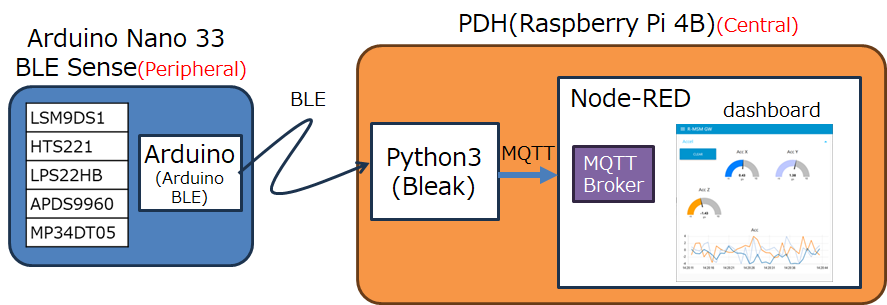
ここで、立ち上げるBLE送受信システムの図を以下に示します。
1)Arduino Nano33 BLE Senseが周辺機器(Peripheral Device)です。センサの情報をBLEで送信します。
BLE接続は、ArduinoBLEライブラリを使います。
2)PDHがセントラル機器(Central Device)です。BLEで接続要求を行い、データをNotify機能で読み込み、ダッシュボードに表示します。BLE接続は、Python3のBreakライブラリを使います。
2.1. ArduinoのBLEライブラリ
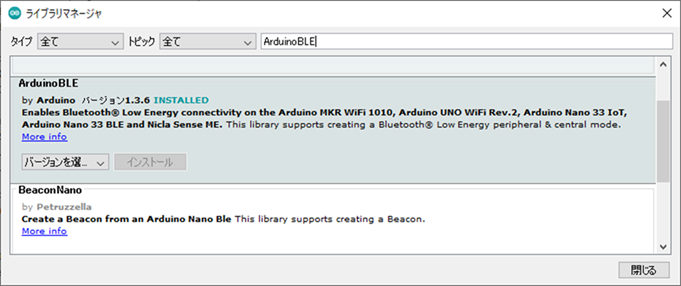
ArduinoのBLEのライブラリは、“ArduinoBLE”です。Arduino IDEのライブラリマネージャから検索してインストールできます。
HP: https://www.arduino.cc/reference/en/libraries/arduinoble/
PeripheralのNotify機能のスケッチ例は、IDEの[ファイル]→[スケッチ例]→[ArduinoBLE]→[Peripheral]→[BatteryMonitor]で確認できます。
2.2. PDHのBLEライブラリ
PDHのBLEライブラリは、PythonのBleakライブラリを使用します。PDHのハードであるRaspberry Piでも動作します。
標準ではインストールされていませんのでインストールする必要があります。端末画面で以下のコマンドでインストールします。
$ python3 –m pip install bleak
HP: https://bleak.readthedocs.io/en/latest/
3. Arduino Nano 33 BLE SenseのBLEプログラム
まず、初めに9軸センサLSM9DS1の9個のデータをNotify機能で送信するプログラムを説明します。
センサを追加するのは、骨格は同じで単純に追加していくだけです。
3.1. 9軸センサLSM9DS1のプログラム
1)概要
ライブラリとして、ArduinoBLEとArduino_LSM9DS1を使用します。
タブを2つ使用しています。メインタブ“pre-nano33BLE”とサブタブ”update_LSM9DS1”です。
プログラムは、Appendix2に載せていますので、そちらからダウンロードしてください。
2)プログラムの説明
以下、プログラムの中身の説明です。
a) メインタブ”pre-nano33BLE”
関数定義:setup()、loop()のみです。
各部のプログラムの動作概要は以下の様になります。
■ 冒頭部
・ライブラリ読込み
・グローバル変数の設定とUUIDの定義
・サービスとcharacteristicのクラスの初期化
DeviceNameは、スマホでBLEデバイスを検索した時に、表示されるデバイス名です。
また、以下の様に、サービスは一つ、特性(Characteritcs)は3つ定義しています。
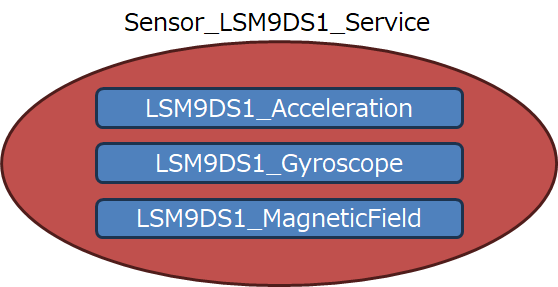
Bleakの特性(Characteristics)には、いくつかの種類があります(リストは“Appedndix2: ArduinoBLEのCharacteristic”を参照ください)。ここでは、“BLEStringCharacteristic”を使っています。
“BLEStringCharacteristic”は、以下の様にヘッダファイルに定義されていて3つの引数をとります。
BLEStringCharacteristic(const char* uuid, unsigned char properties, int valueSize);一つ目がUUIDです。2つ目が、Write、Read、Notifyのどれに対応するサービスかのプロパティ設定です。プロパティの値は、BLEProperty.hに以下の様にenumで定義されています。ここでは、” BLERead | BLENotify“と記述していますので、”0x02 | 0x10“ = ”0x12“を引数として渡していることと等価です。
enum BLEProperty {
BLEBroadcast = 0x01,
BLERead = 0x02,
BLEWriteWithoutResponse = 0x04,
BLEWrite = 0x08,
BLENotify = 0x10,
BLEIndicate = 0x20,
BLEAuthSignedWrite = 1 << 6,
BLEExtProp = 1 << 7,
};
3つ目の引数は、転送するバイト数です。ここでは、24Byteとしています。最大512Byteです。
■setup部
setup(){
・シリアル通信設定
・内蔵LED設定
・LSM9DS1(IMU)スタート
・BLEスタート+LocalName, DeviceName設定
・LSM9DS1初期化:関数“set_LSM9DS1()”の実行
・アドバタイズ開始
}
1) シリアル通信、内蔵LED、LSM9DS1の初期設定を行います。
2) Set_LSM9DS1()で、サービスSensor_LSM9DS1_Serviceのアドバタイズの準備を行います。
3) BLE.advertise();でアドバタイズをスタートします。
■ loop部
loop(){
・BLE接続要求確認
・セントラル機器に接続
・内蔵LED点灯
・セントラル機器に接続されている間、関数”updateValue()“を繰返し実行
・セントラル機器と切断
・内蔵LED消灯
}
1)セントラル機器(Central Device)からの接続要求が来るのを待ちます。
2)接続要求が来たら、接続処理が完了するまで以下の処理を繰返します。
①内蔵LEDを点灯します。
②セントラル機器と接続が完了したか確認する。
3)セントラル機器と接続が完了したら、接続が切れるまで以下の処理を繰返します。
①updateValue();を実行する。
②200ms待つ : delay(200)
4)セントラル機器と接続が終了したら、内蔵LEDを消灯します。
b) サブタブ”update_LSM9DS1”
サブタブ”update_LSM9DS1”は、9軸センサLSM9DS1のデータを読み出し、送信するための関数が記述されています。
関数定義:void set_LSM9DS1(), void readLSM9DS1(), void updateValue()の3つの関数が記述されています。
■ set_LSM9DS1()
1) AdvertisedServiceとして、Sensor_LSM9DS1_Serviceを設定し、
2) そのサービスの特性として、3つのCharacteristic(LSM9DS1_Acceleration, LSM9DS1_Gyroscope, LSM9DS1_MagneticField)を設定します。
3) 加速度センサのサンプルレートを表示します。
■ readLSM9DS1()
3つのセンサの値を読みます。
1)加速度センサの値を読みます(readAcceleration())。
2)角速度センサの値を読みます(readGyroscope())。
3)地磁気センサの値を読みます(readMagneticField())。
■updateValue()
センサの値を読み、送信処理を行います。
1)上記のreadLSM9DS1()を実行し、3つのセンサのデータを読み出します。
2)センサ毎に、読み出したfloat型のデータをString型に変換します。そして、X軸、Y軸、Z軸を繋げて一つの文字列にします。
3)繋げた文字列をシリアル転送(表示)します。
4)繋げた文字列(String型)をBLE送信します。
3. PDH Python3のBLE受信プログラム
ライブラリBleakを使って、BLE受信のPython3のプログラムを作成します。
このプログラムは大きく3つのことを行います。
1) BLEでNotifyデータの受信
bleakライブラリとasyncioライブラリを使って、Notifyに対応した非同期処理を行います。
2) 受信した結果をjson形式に変えます。
jsonライブラリを使って、受信データを以下の様なjson形式にします。
sdata = {“sensor”: “LSM9DS1”, ”func”:”acc”, “data”: 3.5, “unit”:”g’s”}
3) paho.mqtt.clientのライブラリを使って、json形式に変換した受信データをLocalhost内のmqttブローカーにパブリッシングします。
3.1.必要なライブラリのインストール
BLE用のライブラリとmqtt用のライブラリを端末画面からインストールします。BLEはすでに説明済みです。
|
用途 |
ライブラリ名 |
インストールコマンド |
|
BLE用ライブラリ |
bleak |
python3 –m pip install bleak |
|
mqtt用ライブラリ |
paho-mqtt |
python3 –m pip install paho-mqtt |
3.2.プログラムの概要説明
プログラムは、Appendix.3に掲載しています。コピーしてください。プログラム名は“cent_nano33sense.py”としています。
■ 定義部
・ ライブラリのimport
   import sys
   import asyncio
   from bleak import BleakClient
   import paho.mqtt.client as mqtt
   import time
   import json
   import urllib.request
   import struct
・ペリフェラル機器のMACアドレス設定
・UUIDの設定
・mqtt ブローカーの設定
・mqttクライアントを作成
・json形式用の辞書型データ準備
ペリフェラル機器のMACアドレスとUUIDのスキャンの仕方は、R-CPS-HP 第6巻 5-1. BLE機器との接続を参照ください。
■関数定義部
・publish(sdata)
jsonデータを文字列に変換して、パブリッシングします。
・parse_comma_separated_numbers(input_string)
カンマで文字列を分割し、各部分を浮動小数点数に変換します。返り値は浮動小数点の配列です。
・notification_handler1(sender, data: bytearray)
・notification_handler2(sender, data: bytearray)
・notification_handler3(sender, data: bytearray)
各UUIDにNotificationが来た場合の処理内容です。acc,gyro,magに対応しています。
・main(address)
・mqttブローカーへの接続
・asyncioを使って、ペリフェラルへ接続します。
・Notifyの受信処理を開始します。
・20秒経ったら、Notify受信処理を止めます。
・mqttを切断します。
■ 実行部
・asynio.run()
・mainを実行します。その際に、引数が1つあれば、mainの変数である“ADDRESS”に渡します。
3.3.プログラムの動作説明
3.3.1. BLEの受信動作
asyncioライブラリを使った非同期処理を行います。
async with BleakClient(address) as client:
    print(f"Connected: {client.is_connected}")
    await client.start_notify(char_uuid1, notification_handler1)
    await client.start_notify(char_uuid2, notification_handler2)
    await client.start_notify(char_uuid3, notification_handler3)
    await asyncio.sleep(20.0)
    await client.stop_notify(char_uuid1)
    await client.stop_notify(char_uuid2)
    await client.stop_notify(char_uuid3)
1行目で、MAC addressを指定して接続要求を出します。接続がなされると、2行目で、“Connected: アドレス”の表示を行います。
3行目から5行目で、特性(Characteristic)のUUIDを指定してNotify処理の開始をリクエストして、待ち状態に入ります。指定したUUIDのNotifyデータが来ると、関数notification_handlerが呼びだされます。その際に、受信したbytearrayデータが渡されます。
6行目は、20秒スリープする処理ですので、スタートして20秒経つと7行目以降が開始します。
7行目から9行目は、stop_notify()ですので、notify処理を停止するように周辺機器に指示を出します。
■ notification_handlerの動作
notification_handler1~3の動作は基本的に同じです。代表して、notification_handler1()で説明します。
def notification_handler1(sender, data: bytearray):
"""Simple notification handler which sends Acceleration data"""
    data1 = data.decode('utf-8')
    numbers = parse_comma_separated_numbers(data1)
    sdata['sensor'] = 'LS9DS1'
    sdata['func'] = 'acc'
    sdata['data'] = numbers
    sdata['unit'] = 'g\'s'
    publish(sdata)
notification_handler1は、呼び出される際にbytearray型のdataを渡されます。渡されたbytearray型dataは、デコードされてdata1に格納されます。その後、 data1をparse_comma_separated_numbers()関数に渡し、float型のリストdataを取得します。
dataを辞書型データに代入して、関数publish()に渡します。
■ 関数parse_comma_separated_numbers()の動作
この関数は、引数で渡されたString型の文字列を、まず、カンマで分割します。そして、分割した部分partsをfloat型に変換して、リストnumbersに追加していきます。そして、リストnumbersを返します。
def parse_comma_separated_numbers(input_string):
    # カンマで文字列を分割し、各部分を浮動小数点数に変換
    parts = input_string.split(',')
    numbers = []
    for part in parts:
        try:
            number = float(part)
            numbers.append(number)
        except ValueError:
            # 数値に変換できない場合は無視
            pass
    return numbers
3.3.2. MQTTのパブリッシング動作
MQTTのパブリッシング動作は大きく3つに分かれます。
1) 設定
2) 接続、切断
3) パブリッシング
順次説明します。
1)設定
# MQTT ブローカーの設定
broker_address = "localhost"
port = 1883
topic = "sens_data"
# MQTT クライアントを作成
mqtt_client = mqtt.Client()
2行目で”localhost“をbroker_addressとしてます。PDH内のNode-REDにブローカーを立ち上げておりますので、アドレスは、”localhost“になります。
3行目はポート番号です。標準の1883を使っています。ブローカーのポートに合わせる必要があります。4行目で、topicを”sens_data”としています。
6行目で、mqttのClientを立ち上げてています。
2) 接続、切断
接続と切断は、main()関数の中で行っています。
a) 接続
# MQTT ブローカーに接続
mqtt_client.connect(broker_address, port)
print(f"MQTT connected: {broker_address}")
b) 切断
# MQTT クライアントを切断
mqtt_client.disconnect()
3) パブリッシング
パブリッシングは、関数publish()で行っています。
def publish(sdata):
    # Publish on MQTT
    # JSON データを文字列に変換
    json_data = json.dumps(sdata)
    # トピックに JSON データをパブリッシュ
    mqtt_client.publish(topic, json_data)
引数として、辞書型データsdataを受取ります。4行目で辞書型データをjsonデータに変換します。6行目で、パブリッシングしています。
4. Node-REDのフロー
Pythonのプログラムの起動とmqttでパブリッシングされたデータを受取りダッシュボードに表示するNode-REDのフローをAppendix4に載せています。ダウンロードして、Node-REDに読み込ませて使用して下さい。
このフローは、以下の4つのセンサのBLE受信に対応しています。LSM9D1だけでも動作させることができます。
1) LSM9DS1:9-axis IMU
2)HTS221:humidity sensor
3)LPS22HB:Barometer and temperature sensor
4)APDS9960: Procimity/Color
4つのセンサすべてに対応したArduinoのプログラムとPDHのPythonプログラムはそれぞれ、Appendix5とAppendix6に載せています。
基本的に、LSM9DS1の拡張しただけですので、上記の説明とコードを見てもらえれば理解できると思います。
Appedndix1. ArduinoBLEのCharacteristics
・送信するデータの型ごとにCharacteristicが準備されている。BLEStringCharacteristicのみ512Byteまで一度に送ることができます。
ただし、String型なので、数字を4bitごとに’0’~’F’に変換して送る必要があります。ただし、ASCIIコードの’0’~’F’は1Byte(=8bit)ですので、Short型16bitを送るのに、(16bit÷4bit)×8bit = 32bitを送ることになります。
BLEBoolCharacteristic
BLEBooleanCharacteristic
BLECharCharacteristic
BLEUnsignedCharCharacteristic
BLEByteCharacteristic
BLEShortCharacteristic
BLEUnsignedShortCharacteristic
BLEWordCharacteristic
BLEIntCharacteristic
BLEUnsignedIntCharacteristic
BLELongCharacteristic
BLEUnsignedLongCharacteristic
BLEFloatCharacteristic
BLEDoubleCharacteristic
BLEStringCharacteristic
Appendix2. Arduino Nano 33 BLE Senseのサンプルプログラム
「2. Arduino Nano 33 BLE SenseのBLEプログラム」で説明したプログラムを以下に載せます。
■ メインタブ:pre-nano33BLE.ino
/*
 * Arduino LSM9DS1 : send sensordata on BLE
 */

#include <arduinoble.h>
#include <arduino_lsm9ds1.h>

#define localNAME "peri_LSM9DS1"
#define DeviceNAME "nano33BLE"

// UUID
#define LSM9DS1_SERVICE_UUID "9997c270-9b20-4181-808f-ef2de31032a8"
#define LSM9DS1_Acceleration_Characteristic_UUID "9997c270-9b21-4181-808f-ef2de31032a8"
#define LSM9DS1_Gyroscope_Characteristic_UUID "9997c270-9b22-4181-808f-ef2de31032a8"
#define LSM9DS1_MagneticField_Characteristic_UUID "9997c270-9b23-4181-808f-ef2de31032a8"

float AccelerationX = 0, AccelerationY = 0, AccelerationZ = 0;
float GyroscopeX = 0, GyroscopeY = 0, GyroscopeZ = 0;
float MagneticX = 0, MagneticY = 0, MagneticZ = 0;

float oldValue = 0;  // last value

// BLE Service
BLEService Sensor_LSM9DS1_Service(LSM9DS1_SERVICE_UUID);

// BLE  Characteristic
BLEStringCharacteristic LSM9DS1_Acceleration(LSM9DS1_Acceleration_Characteristic_UUID, BLERead | BLENotify, 24);
BLEStringCharacteristic LSM9DS1_Gyroscope(LSM9DS1_Gyroscope_Characteristic_UUID, BLERead | BLENotify, 24);
BLEStringCharacteristic LSM9DS1_MagneticField(LSM9DS1_MagneticField_Characteristic_UUID, BLERead | BLENotify, 24);

void setup() {
  Serial.begin(9600);
  //while (!Serial);
  Serial.println("Started");

  pinMode(LED_BUILTIN, OUTPUT); // initialize the built-in LED pin to indicate when a central is connected

  if (!IMU.begin()) {
    Serial.println("Failed to initialize IMU!");
    while (1);
  }

  // BLE begin initialization
  if (!BLE.begin()) {
    Serial.println("starting BLE failed!");
    while (1);
  }

  BLE.setLocalName(localNAME);
  BLE.setDeviceName(DeviceNAME);

  set_LSM9DS1();

  // start advertising
  BLE.advertise();
  Serial.println("Bluetooth device active, waiting for connections...");
}

void loop() {
  // wait for a BLE central
  BLEDevice central = BLE.central();

  // if a central is connected to the peripheral:
  if (central) {
    //delay(100);
    Serial.print("Connected to central: ");
    // print the central's BT address:
    Serial.println(central.address());
    // turn on the LED to indicate the connection:
    digitalWrite(LED_BUILTIN, HIGH);

    // check the battery level every 200ms
    // while the central is connected:
    while (central.connected()) {
        updateValue();
        delay(200);
    }
    // when the central disconnects
    digitalWrite(LED_BUILTIN, LOW);
    Serial.print("Disconnected from central: ");
    Serial.println(central.address());
  }
}
■サブタブ: update_LSM9DS1.ino
#include <arduinoble.h>
#include <arduino_lsm9ds1.h>

void set_LSM9DS1(){
  // add the service UUID
  BLE.setAdvertisedService(Sensor_LSM9DS1_Service);

  // add characteristic
  Sensor_LSM9DS1_Service.addCharacteristic(LSM9DS1_Acceleration);
  Sensor_LSM9DS1_Service.addCharacteristic(LSM9DS1_Gyroscope);
  Sensor_LSM9DS1_Service.addCharacteristic(LSM9DS1_MagneticField);

  // Add service
  BLE.addService(Sensor_LSM9DS1_Service);

  // set initial value for this characteristic
  LSM9DS1_Acceleration.writeValue(String(oldValue));
  LSM9DS1_Gyroscope.writeValue(String(oldValue));
  LSM9DS1_MagneticField.writeValue(String(oldValue));

  // Accelerometer
  Serial.print("Accelerometer sample rate = ");
  Serial.print(IMU.accelerationSampleRate());
  Serial.println(" Hz");
}

void readLSM9DS1() {
  if (IMU.accelerationAvailable()) {
    IMU.readAcceleration(AccelerationX, AccelerationY, AccelerationZ);
  }
  if (IMU.gyroscopeAvailable()) {
    IMU.readGyroscope(GyroscopeX, GyroscopeY, GyroscopeZ);
  }
  if (IMU.magneticFieldAvailable()) {
    IMU.readMagneticField(MagneticX, MagneticY, MagneticZ);
  }
}

void updateValue() {
  readLSM9DS1();
  String valueof_LSM9DS1_Acceleration = String(AccelerationX) + "," +  String(AccelerationY) + "," + String(AccelerationZ);
  String valueof_LSM9DS1_Gyroscope = String(GyroscopeX) + "," +  String(GyroscopeY) + "," + String(GyroscopeZ);
  String valueof_LSM9DS1_MagneticField = String(MagneticX) + "," +  String(MagneticY) + "," + String(MagneticZ);

  Serial.print("---\nLSM9DS1_Acceleration % is now: ");
  Serial.println(String(AccelerationX) + "," +  String(AccelerationY) + "," + String(AccelerationZ));
  Serial.print("LSM9DS1_Gyroscope % is now: ");
  Serial.println(String(GyroscopeX) + "," +  String(GyroscopeY) + "," + String(GyroscopeZ));
  Serial.print("LSM9DS1_MagneticField % is now: ");
  Serial.println(String(MagneticX) + "," +  String(MagneticY) + "," + String(MagneticZ));

  // update  characteristic
  LSM9DS1_Acceleration.writeValue(valueof_LSM9DS1_Acceleration);
  LSM9DS1_Gyroscope.writeValue(valueof_LSM9DS1_Gyroscope);
  LSM9DS1_MagneticField.writeValue(valueof_LSM9DS1_MagneticField);
}
Appendix3. PDH用Python3のBLE受信プログラム
プログラム名:cent_nano33sense.py
# -*- coding: utf-8 -*-
import sys
import asyncio
from bleak import BleakClient

import paho.mqtt.client as mqtt
import time
import json
import urllib.request
import struct

# setting for BLE
ADDRESS = (
    "C6:7E:08:31:54:2C" # Arduino Nano 33 BLE sense
)
# UUID for LSM9DS1
CHARACTERISTIC_UUID1 = "9997c270-9b21-4181-808f-ef2de31032a8" # read & notify
CHARACTERISTIC_UUID2 = "9997c270-9b22-4181-808f-ef2de31032a8" # read & notify
CHARACTERISTIC_UUID3 = "9997c270-9b23-4181-808f-ef2de31032a8" # read & notify

# MQTT ブローカーの設定
broker_address = "localhost"
port = 1883
topic = "sens_data"
# MQTT クライアントを作成
mqtt_client = mqtt.Client()

data = [0.0,0.0,0.0]
sdata = {    # 辞書型データ
    'sensor': 'LSM9DS1',
    'func':'none',
    'data': data,
    'unit':'-'
}

def publish(sdata):
    # Publish on MQTT
    # JSON データを文字列に変換
    json_data = json.dumps(sdata)
    # トピックに JSON データをパブリッシュ
    mqtt_client.publish(topic, json_data)

def parse_comma_separated_numbers(input_string):
    # カンマで文字列を分割し、各部分を浮動小数点数に変換
    parts = input_string.split(',')
    numbers = []
    for part in parts:
        try:
            number = float(part)
            numbers.append(number)
        except ValueError:
            # 数値に変換できない場合は無視
            pass
    return numbers

def notification_handler1(sender, data: bytearray):
    """Simple notification handler which sends Acceleration data"""
    data1 = data.decode('utf-8')
    numbers = parse_comma_separated_numbers(data1)
    sdata['sensor'] = 'LS9DS1'
    sdata['func'] = 'acc'
    sdata['data'] = numbers
    sdata['unit'] = 'g\'s'
    print(sdata)
    publish(sdata)

def notification_handler2(sender, data: bytearray):
    """Simple notification handler which sends Gyroscope data"""
    data1 = data.decode('utf-8')
    numbers = parse_comma_separated_numbers(data1)
    sdata['sensor'] = 'LS9DS1'
    sdata['func'] = 'gyr'
    sdata['data'] = numbers
    sdata['unit'] = 'deg/s'
    print(sdata)
    publish(sdata)

def notification_handler3(sender, data: bytearray):
    """Simple notification handler which sends Magnetometer data"""
    data1 = data.decode('utf-8')
    numbers = parse_comma_separated_numbers(data1)
    sdata['sensor'] = 'LS9DS1'
    sdata['func'] = 'mag'
    sdata['data'] = numbers
    sdata['unit'] = 'uT'
    print(sdata)
    publish(sdata)

async def main(address):
    char_uuid1 = CHARACTERISTIC_UUID1
    char_uuid2 = CHARACTERISTIC_UUID2
    char_uuid3 = CHARACTERISTIC_UUID3

    # MQTT ブローカーに接続
    mqtt_client.connect(broker_address, port)
    print(f"MQTT connected: {broker_address}")

    print(address, char_uuid1, char_uuid2, char_uuid3)
    async with BleakClient(address) as client:
        print(f"Connected: {client.is_connected}")
        await client.start_notify(char_uuid1, notification_handler1)
        await client.start_notify(char_uuid2, notification_handler2)
        await client.start_notify(char_uuid3, notification_handler3)
        await asyncio.sleep(20.0)
        await client.stop_notify(char_uuid1)
        await client.stop_notify(char_uuid2)
        await client.stop_notify(char_uuid3)

    # MQTT クライアントを切断
    mqtt_client.disconnect()

if __name__ == "__main__":
    asyncio.run(
        main(
            sys.argv[1] if len(sys.argv) > 1 else ADDRESS,
        )
    )
Appendix4. Node-REDフロー
[{"id":"4318ede167f7d57c","type":"tab","label":"BLE_central","disabled":false,"info":"","env":[]},{"id":"9b6a584f87885f5c","type":"aedes broker","z":"4318ede167f7d57c","name":"","mqtt_port":1883,"mqtt_ws_bind":"port","mqtt_ws_port":null,"mqtt_ws_path":"","cert":"","key":"","certname":"","keyname":"","persistence_bind":"memory","dburl":"","usetls":false,"x":110,"y":60,"wires":[[],[]]},{"id":"174f5aada30b3a72","type":"comment","z":"4318ede167f7d57c","name":"MQTT Broker","info":"","x":90,"y":20,"wires":[]},{"id":"07adb671f03c633a","type":"mqtt in","z":"4318ede167f7d57c","name":"","topic":"sens_data","qos":"2","datatype":"auto-detect","broker":"496bc63a53e5165b","nl":false,"rap":true,"rh":0,"inputs":0,"x":100,"y":360,"wires":[["6925765e1b31a1d8"]]},{"id":"94abf6961cce2ae1","type":"inject","z":"4318ede167f7d57c","name":"BLE","props":[{"p":"payload"},{"p":"topic","vt":"str"}],"repeat":"","crontab":"","once":false,"onceDelay":0.1,"topic":"","payload":"EC:B6:91:D3:19:08","payloadType":"str","x":150,"y":160,"wires":[["921c879a2f7193b0"]]},{"id":"921c879a2f7193b0","type":"exec","z":"4318ede167f7d57c","command":"python3 /home/pi/source/python/ble/cent_nano33sense_3.py","addpay":"payload","append":"","useSpawn":"false","timer":"","winHide":false,"oldrc":false,"name":"Connect peripheral","x":350,"y":180,"wires":[[],["6e7a11a2dc5c4a47"],["6e7a11a2dc5c4a47"]]},{"id":"6e7a11a2dc5c4a47","type":"debug","z":"4318ede167f7d57c","name":"debug 52","active":true,"tosidebar":true,"console":false,"tostatus":false,"complete":"false","statusVal":"","statusType":"auto","x":520,"y":180,"wires":[]},{"id":"4a8105525f9008dc","type":"inject","z":"4318ede167f7d57c","name":"BLE sensor","props":[{"p":"payload"},{"p":"topic","vt":"str"}],"repeat":"","crontab":"","once":false,"onceDelay":0.1,"topic":"","payload":"C6:7E:08:31:54:2C","payloadType":"str","x":130,"y":200,"wires":[["921c879a2f7193b0"]]},{"id":"2bd1e30f169e6d12","type":"switch","z":"4318ede167f7d57c","name":"センサ","property":"payload.sensor","propertyType":"msg","rules":[{"t":"eq","v":"LSM9DS1","vt":"str"},{"t":"eq","v":"HTS221","vt":"str"},{"t":"eq","v":"LPS22HB","vt":"str"},{"t":"eq","v":"APDS9960","vt":"str"}],"checkall":"false","repair":false,"outputs":4,"x":350,"y":360,"wires":[["796bf116c0c1374e"],["950ad94df36ef560"],["aa05d174c78896a9"],["ccafa92d6643e6a2"]]},{"id":"6925765e1b31a1d8","type":"moment","z":"4318ede167f7d57c","name":"日時","topic":"","input":"","inputType":"date","inTz":"Asia/Tokyo","adjAmount":0,"adjType":"days","adjDir":"add","format":"YYYY/MM/DDTHH:mm:ss.SSSZ","locale":"ja-JP","output":"payload.datetime","outputType":"msg","outTz":"Asia/Tokyo","x":230,"y":360,"wires":[["2bd1e30f169e6d12","393b9237dcb4bd95"]]},{"id":"d23d8983f3c3ce9f","type":"comment","z":"4318ede167f7d57c","name":"Central Operation","info":"","x":110,"y":120,"wires":[]},{"id":"c4b5a50629e2cb85","type":"comment","z":"4318ede167f7d57c","name":"Receive Data","info":"","x":90,"y":300,"wires":[]},{"id":"d5d67217d3a696f5","type":"comment","z":"4318ede167f7d57c","name":"LSM9DS1:9-axis IMU","info":"","x":600,"y":300,"wires":[]},{"id":"950ad94df36ef560","type":"link out","z":"4318ede167f7d57c","name":"HTS221 out","mode":"link","links":["c88ffeff574def78"],"x":445,"y":340,"wires":[]},{"id":"01e658e02388dfa6","type":"comment","z":"4318ede167f7d57c","name":"HTS221:humidity sensor","info":"","x":610,"y":340,"wires":[]},{"id":"aa05d174c78896a9","type":"link out","z":"4318ede167f7d57c","name":"LPS22HB out","mode":"link","links":["f453dc2d69c90d36"],"x":445,"y":380,"wires":[]},{"id":"fcec41388639d9aa","type":"comment","z":"4318ede167f7d57c","name":"LPS22HB:Barometer and temperature sensor","info":"","x":670,"y":380,"wires":[]},{"id":"393b9237dcb4bd95","type":"debug","z":"4318ede167f7d57c","name":"debug 56","active":false,"tosidebar":true,"console":false,"tostatus":false,"complete":"false","statusVal":"","statusType":"auto","x":340,"y":280,"wires":[]},{"id":"ccafa92d6643e6a2","type":"link out","z":"4318ede167f7d57c","name":"APD9960 out","mode":"link","links":["ae838c6afef41082"],"x":445,"y":420,"wires":[]},{"id":"f993839d487d6c69","type":"comment","z":"4318ede167f7d57c","name":"APDS9960: Procimity/Color","info":"","x":620,"y":420,"wires":[]},{"id":"796bf116c0c1374e","type":"link out","z":"4318ede167f7d57c","name":"LSM9DS1 out","mode":"link","links":["bd27cd19.a5742"],"x":445,"y":300,"wires":[]},{"id":"121d618a.e1fa2e","type":"tab","label":"BMX160 motion","disabled":false,"info":""},{"id":"62085bcc.f21184","type":"ui_gauge","z":"121d618a.e1fa2e","name":"Acc Y","group":"86efbccc.237b2","order":2,"width":4,"height":3,"gtype":"gage","title":"Acc Y","label":"{{msg.payload.unit}}","format":"{{msg.payload.data[1]}}","min":"-10","max":"10","colors":["#bec8ff","#bec8ff","#bec8ff"],"seg1":"","seg2":"","diff":false,"className":"","x":520,"y":120,"wires":[]},{"id":"39abdbd9.fccb94","type":"ui_gauge","z":"121d618a.e1fa2e","name":"Acc Z","group":"86efbccc.237b2","order":3,"width":4,"height":3,"gtype":"gage","title":"Acc Z","label":"{{msg.payload.unit}}","format":"{{msg.payload.data[2]}}","min":"-10","max":"10","colors":["#ffa000","#ffa000","#ffa000"],"seg1":"","seg2":"","diff":false,"className":"","x":520,"y":160,"wires":[]},{"id":"fe6b534b.9391b","type":"ui_gauge","z":"121d618a.e1fa2e","name":"Acc X","group":"86efbccc.237b2","order":1,"width":4,"height":3,"gtype":"gage","title":"Acc X","label":"{{msg.payload.unit}}","format":"{{msg.payload.data[0]}}","min":"-10","max":"10","colors":["#0080ff","#0080ff","#0080ff"],"seg1":"","seg2":"","diff":false,"className":"","x":520,"y":80,"wires":[]},{"id":"6092174f.4565e8","type":"change","z":"121d618a.e1fa2e","name":"acc X 抽出","rules":[{"t":"set","p":"payload","pt":"msg","to":"payload.data[0]","tot":"msg"},{"t":"set","p":"topic","pt":"msg","to":"accX","tot":"str"}],"action":"","property":"","from":"","to":"","reg":false,"x":690,"y":80,"wires":[["bb6b826d.169ce"]]},{"id":"292e9370.86017c","type":"change","z":"121d618a.e1fa2e","name":"Acc Y 抽出","rules":[{"t":"set","p":"payload","pt":"msg","to":"payload.data[1]","tot":"msg"},{"t":"set","p":"topic","pt":"msg","to":"accY","tot":"str"}],"action":"","property":"","from":"","to":"","reg":false,"x":690,"y":120,"wires":[["bb6b826d.169ce"]]},{"id":"a107abd1.d50e98","type":"change","z":"121d618a.e1fa2e","name":"Acc Z 抽出","rules":[{"t":"set","p":"payload","pt":"msg","to":"payload.data[2]","tot":"msg"},{"t":"set","p":"topic","pt":"msg","to":"accZ","tot":"str"}],"action":"","property":"","from":"","to":"","reg":false,"x":690,"y":160,"wires":[["bb6b826d.169ce"]]},{"id":"a5d27a5c.503b38","type":"ui_gauge","z":"121d618a.e1fa2e","d":true,"name":"Gyro X","group":"","order":1,"width":3,"height":3,"gtype":"gage","title":"Gyro X","label":"","format":"{{msg.payload.gyro.val[0]}}","min":"-10","max":"10","colors":["#00b500","#e6e600","#ca3838"],"seg1":"","seg2":"","diff":false,"className":"","x":520,"y":220,"wires":[]},{"id":"9893e338.f3ce","type":"change","z":"121d618a.e1fa2e","d":true,"name":"Gyro X 抽出","rules":[{"t":"set","p":"payload","pt":"msg","to":"payload.gyro.val[0]","tot":"msg"},{"t":"set","p":"topic","pt":"msg","to":"gyroX","tot":"str"}],"action":"","property":"","from":"","to":"","reg":false,"x":690,"y":220,"wires":[["5b8bf4ce.395a5c"]]},{"id":"5b8bf4ce.395a5c","type":"ui_chart","z":"121d618a.e1fa2e","d":true,"name":"chart Gyro","group":"","order":7,"width":12,"height":4,"label":"Gyro","chartType":"line","legend":"false","xformat":"mm:ss","interpolate":"linear","nodata":"","dot":false,"ymin":"-4","ymax":"4","removeOlder":"2","removeOlderPoints":"","removeOlderUnit":"1","cutout":0,"useOneColor":false,"useUTC":false,"colors":["#1f77b4","#aec7e8","#ff7f0e","#2ca02c","#98df8a","#d62728","#ff9896","#9467bd","#c5b0d5"],"outputs":1,"useDifferentColor":false,"x":880,"y":260,"wires":[[]]},{"id":"acc450e0.0b891","type":"change","z":"121d618a.e1fa2e","d":true,"name":"Gyro Y 抽出","rules":[{"t":"set","p":"payload","pt":"msg","to":"payload.gyro.val[1]","tot":"msg"},{"t":"set","p":"topic","pt":"msg","to":"gyroY","tot":"str"}],"action":"","property":"","from":"","to":"","reg":false,"x":690,"y":260,"wires":[["5b8bf4ce.395a5c"]]},{"id":"27bb27a2.c23548","type":"change","z":"121d618a.e1fa2e","d":true,"name":"Gyro Z 抽出","rules":[{"t":"set","p":"payload","pt":"msg","to":"payload.gyro.val[2]","tot":"msg"},{"t":"set","p":"topic","pt":"msg","to":"gyroZ","tot":"str"}],"action":"","property":"","from":"","to":"","reg":false,"x":690,"y":300,"wires":[["5b8bf4ce.395a5c"]]},{"id":"d601fabb.278ee8","type":"ui_gauge","z":"121d618a.e1fa2e","d":true,"name":"Gyro Y","group":"","order":2,"width":3,"height":3,"gtype":"gage","title":"Gyro Y","label":"","format":"{{msg.payload.gyro.val[1]}}","min":"-10","max":"10","colors":["#00b500","#e6e600","#ca3838"],"seg1":"","seg2":"","x":520,"y":260,"wires":[]},{"id":"fdcad618.e31cf8","type":"ui_gauge","z":"121d618a.e1fa2e","d":true,"name":"Gyro Z","group":"","order":3,"width":3,"height":3,"gtype":"gage","title":"Gyro Z","label":"","format":"{{msg.payload.gyro.val[2]}}","min":"-10","max":"0","colors":["#00b500","#e6e600","#ca3838"],"seg1":"","seg2":"","x":520,"y":300,"wires":[]},{"id":"24ad861f.a8d13a","type":"ui_gauge","z":"121d618a.e1fa2e","d":true,"name":"Mag X","group":"","order":1,"width":3,"height":3,"gtype":"gage","title":"Mag X","label":"","format":"{{msg.payload.magX}}","min":0,"max":"10000","colors":["#00b500","#e6e600","#ca3838"],"seg1":"","seg2":"","x":520,"y":360,"wires":[]},{"id":"335f6fd5.3d476","type":"change","z":"121d618a.e1fa2e","d":true,"name":"mag X 抽出","rules":[{"t":"set","p":"payload","pt":"msg","to":"payload.mag.val[0]","tot":"msg"},{"t":"set","p":"topic","pt":"msg","to":"magX","tot":"str"}],"action":"","property":"","from":"","to":"","reg":false,"x":690,"y":360,"wires":[["1130ec0e.72eb74"]]},{"id":"1130ec0e.72eb74","type":"ui_chart","z":"121d618a.e1fa2e","d":true,"name":"chart Mag","group":"","order":7,"width":12,"height":4,"label":"Mag","chartType":"line","legend":"false","xformat":"HH:mm:ss","interpolate":"linear","nodata":"","dot":false,"ymin":"","ymax":"","removeOlder":"3","removeOlderPoints":"","removeOlderUnit":"1","cutout":0,"useOneColor":false,"useUTC":false,"colors":["#1f77b4","#aec7e8","#ff7f0e","#2ca02c","#98df8a","#d62728","#ff9896","#9467bd","#c5b0d5"],"outputs":1,"useDifferentColor":false,"x":870,"y":400,"wires":[[]]},{"id":"748a28ae.56ea58","type":"change","z":"121d618a.e1fa2e","d":true,"name":"mag Y 抽出","rules":[{"t":"set","p":"payload","pt":"msg","to":"payload.mag.val[1]","tot":"msg"},{"t":"set","p":"topic","pt":"msg","to":"magY","tot":"str"}],"action":"","property":"","from":"","to":"","reg":false,"x":690,"y":400,"wires":[["1130ec0e.72eb74"]]},{"id":"e7259f05.57ad2","type":"change","z":"121d618a.e1fa2e","d":true,"name":"mag Z 抽出","rules":[{"t":"set","p":"payload","pt":"msg","to":"payload.mag.val[2]","tot":"msg"},{"t":"set","p":"topic","pt":"msg","to":"magZ","tot":"str"}],"action":"","property":"","from":"","to":"","reg":false,"x":690,"y":440,"wires":[["1130ec0e.72eb74"]]},{"id":"9a8cf35.04ba11","type":"ui_gauge","z":"121d618a.e1fa2e","d":true,"name":"Mag Y","group":"","order":2,"width":3,"height":3,"gtype":"gage","title":"Mag Y","label":"","format":"{{msg.payload.magY}}","min":0,"max":"10000","colors":["#00b500","#e6e600","#ca3838"],"seg1":"","seg2":"","x":520,"y":400,"wires":[]},{"id":"15fcbbf7.cd3c44","type":"ui_gauge","z":"121d618a.e1fa2e","d":true,"name":"Mag Z","group":"","order":3,"width":3,"height":3,"gtype":"gage","title":"Mag Z","label":"","format":"{{msg.payload.magZ}}","min":0,"max":"10000","colors":["#00b500","#e6e600","#ca3838"],"seg1":"","seg2":"","x":520,"y":440,"wires":[]},{"id":"bb6b826d.169ce","type":"ui_chart","z":"121d618a.e1fa2e","name":"chart Acc","group":"86efbccc.237b2","order":4,"width":12,"height":4,"label":"Acc","chartType":"line","legend":"false","xformat":"HH:mm:ss","interpolate":"linear","nodata":"","dot":false,"ymin":"","ymax":"","removeOlder":"1","removeOlderPoints":"","removeOlderUnit":"60","cutout":0,"useOneColor":false,"useUTC":false,"colors":["#1f77b4","#aec7e8","#ff7f0e","#2ca02c","#98df8a","#d62728","#ff9896","#9467bd","#c5b0d5"],"outputs":1,"useDifferentColor":false,"className":"","x":870,"y":120,"wires":[[]]},{"id":"98e8bd77.61c32","type":"delay","z":"121d618a.e1fa2e","name":"","pauseType":"rate","timeout":"5","timeoutUnits":"seconds","rate":"4","nbRateUnits":"1","rateUnits":"second","randomFirst":"1","randomLast":"5","randomUnits":"seconds","drop":true,"outputs":1,"x":170,"y":260,"wires":[["758ec401595286f3","dfb45a228bf26177"]]},{"id":"bd27cd19.a5742","type":"link in","z":"121d618a.e1fa2e","name":"BMX160-dashboard-in","links":["796bf116c0c1374e"],"x":55,"y":260,"wires":[["98e8bd77.61c32"]]},{"id":"758ec401595286f3","type":"switch","z":"121d618a.e1fa2e","name":"","property":"payload.func","propertyType":"msg","rules":[{"t":"eq","v":"acc","vt":"str"},{"t":"eq","v":"gyr","vt":"str"},{"t":"eq","v":"mag","vt":"str"}],"checkall":"true","repair":false,"outputs":3,"x":310,"y":260,"wires":[["fe6b534b.9391b","62085bcc.f21184","39abdbd9.fccb94","6092174f.4565e8","292e9370.86017c","a107abd1.d50e98"],["a5d27a5c.503b38","d601fabb.278ee8","fdcad618.e31cf8","9893e338.f3ce","acc450e0.0b891","27bb27a2.c23548"],["24ad861f.a8d13a","9a8cf35.04ba11","15fcbbf7.cd3c44","335f6fd5.3d476","748a28ae.56ea58","e7259f05.57ad2"]]},{"id":"dfb45a228bf26177","type":"debug","z":"121d618a.e1fa2e","name":"debug 53","active":false,"tosidebar":true,"console":false,"tostatus":false,"complete":"false","statusVal":"","statusType":"auto","x":320,"y":160,"wires":[]},{"id":"63ab629e59963e0b","type":"link in","z":"121d618a.e1fa2e","name":"link in 15","links":["21d96276cec6629b"],"x":805,"y":40,"wires":[["bb6b826d.169ce"]]},{"id":"2b058f3ebbeded5b","type":"tab","label":"Environment","disabled":false,"info":"","env":[]},{"id":"c88ffeff574def78","type":"link in","z":"2b058f3ebbeded5b","name":"link in 12","links":["950ad94df36ef560"],"x":125,"y":120,"wires":[["382e812d5d1a370d"]]},{"id":"c61d0c37f698053e","type":"comment","z":"2b058f3ebbeded5b","name":"HTS221","info":"","x":100,"y":80,"wires":[]},{"id":"f453dc2d69c90d36","type":"link in","z":"2b058f3ebbeded5b","name":"link in 13","links":["aa05d174c78896a9"],"x":125,"y":200,"wires":[["64dda0449aee633e"]]},{"id":"5aab53607ab91ab7","type":"comment","z":"2b058f3ebbeded5b","name":"LPS22HB","info":"","x":100,"y":160,"wires":[]},{"id":"382e812d5d1a370d","type":"change","z":"2b058f3ebbeded5b","name":"HTS221","rules":[{"t":"set","p":"payload.temp.val","pt":"msg","to":"payload.data[0]","tot":"msg"},{"t":"set","p":"payload.humid.val","pt":"msg","to":"payload.data[1]","tot":"msg"},{"t":"set","p":"payload.temp.unit","pt":"msg","to":"deg","tot":"str"},{"t":"set","p":"payload.humid.unit","pt":"msg","to":"%","tot":"str"},{"t":"delete","p":"payload.func","pt":"msg"},{"t":"delete","p":"payload.data","pt":"msg"},{"t":"delete","p":"payload.unit","pt":"msg"}],"action":"","property":"","from":"","to":"","reg":false,"x":240,"y":120,"wires":[["3e520e86eaa499e3","64c87cb90e49f0d7"]]},{"id":"64dda0449aee633e","type":"change","z":"2b058f3ebbeded5b","name":"LPS22HB","rules":[{"t":"set","p":"payload.press.val","pt":"msg","to":"payload.data[0]","tot":"msg"},{"t":"set","p":"payload.temp.val","pt":"msg","to":"payload.data[1]","tot":"msg"},{"t":"set","p":"payload.press.unit","pt":"msg","to":"kPa","tot":"str"},{"t":"set","p":"payload.temp.unit","pt":"msg","to":"deg","tot":"str"},{"t":"delete","p":"payload.func","pt":"msg"},{"t":"delete","p":"payload.data","pt":"msg"},{"t":"delete","p":"payload.unit","pt":"msg"}],"action":"","property":"","from":"","to":"","reg":false,"x":240,"y":200,"wires":[["6ee19ba634662f1f","49c95673f1c4b7ac"]]},{"id":"3e520e86eaa499e3","type":"debug","z":"2b058f3ebbeded5b","name":"debug 54","active":false,"tosidebar":true,"console":false,"tostatus":false,"complete":"false","statusVal":"","statusType":"auto","x":400,"y":80,"wires":[]},{"id":"6ee19ba634662f1f","type":"debug","z":"2b058f3ebbeded5b","name":"debug 55","active":false,"tosidebar":true,"console":false,"tostatus":false,"complete":"false","statusVal":"","statusType":"auto","x":400,"y":160,"wires":[]},{"id":"ec6247c1b1fdf8db","type":"ui_gauge","z":"2b058f3ebbeded5b","name":"Temperature(HTS221)","group":"54e6df2daa3e5930","order":1,"width":3,"height":3,"gtype":"gage","title":"気温","label":"{{msg.payload.temp.unit}}","format":"{{msg.payload.temp.val}}","min":"-20","max":"40","colors":["#00b500","#e6e600","#ca3838"],"seg1":"","seg2":"","diff":false,"className":"","x":440,"y":300,"wires":[]},{"id":"fce1589d2175f005","type":"delay","z":"2b058f3ebbeded5b","name":"","pauseType":"rate","timeout":"5","timeoutUnits":"seconds","rate":"4","nbRateUnits":"1","rateUnits":"second","randomFirst":"1","randomLast":"5","randomUnits":"seconds","drop":true,"outputs":1,"x":190,"y":520,"wires":[["b1a291011c052305","9d20b00bec1237d9","65200431f0ad9b83","1f6ab02924d39720"]]},{"id":"6ebfbbb8bd2f4c04","type":"link in","z":"2b058f3ebbeded5b","name":"BME680-dashboard-in","links":["49c95673f1c4b7ac"],"x":85,"y":520,"wires":[["fce1589d2175f005"]]},{"id":"95155e899e4d200d","type":"ui_gauge","z":"2b058f3ebbeded5b","name":"Humidity(HTS221)","group":"54e6df2daa3e5930","order":3,"width":3,"height":3,"gtype":"gage","title":"湿度","label":"{{msg.payload.humid.unit}}","format":"{{msg.payload.humid.val}}","min":0,"max":"100","colors":["#00b500","#e6e600","#ca3838"],"seg1":"","seg2":"","diff":false,"className":"","x":430,"y":340,"wires":[]},{"id":"b1a291011c052305","type":"ui_gauge","z":"2b058f3ebbeded5b","name":"Air Pressure(LPS22HB)","group":"54e6df2daa3e5930","order":4,"width":3,"height":3,"gtype":"gage","title":"気圧","label":"{{msg.payload.press.unit}}","format":"{{msg.payload.press.val}}","min":"900","max":"1100","colors":["#00b500","#e6e600","#ca3838"],"seg1":"","seg2":"","diff":false,"className":"","x":450,"y":540,"wires":[]},{"id":"e7adf706ec819ad1","type":"change","z":"2b058f3ebbeded5b","name":"temp 抽出","rules":[{"t":"set","p":"payload","pt":"msg","to":"payload.temp.val","tot":"msg"},{"t":"set","p":"topic","pt":"msg","to":"HTS221","tot":"str"}],"action":"","property":"","from":"","to":"","reg":false,"x":400,"y":380,"wires":[["1b99d25bce0b4325"]]},{"id":"99b3cfed02f721bb","type":"change","z":"2b058f3ebbeded5b","name":"humid 抽出","rules":[{"t":"set","p":"payload","pt":"msg","to":"payload.humid.val","tot":"msg"}],"action":"","property":"","from":"","to":"","reg":false,"x":410,"y":420,"wires":[["2da35474374d9364"]]},{"id":"9d20b00bec1237d9","type":"change","z":"2b058f3ebbeded5b","name":"press 抽出","rules":[{"t":"set","p":"payload","pt":"msg","to":"payload.press.val","tot":"msg"}],"action":"","property":"","from":"","to":"","reg":false,"x":410,"y":500,"wires":[["0f95790e003a765a"]]},{"id":"1b99d25bce0b4325","type":"ui_chart","z":"2b058f3ebbeded5b","name":"chart Temperature","group":"54e6df2daa3e5930","order":8,"width":15,"height":4,"label":"気温(℃)","chartType":"line","legend":"true","xformat":"HH:mm:ss","interpolate":"linear","nodata":"","dot":false,"ymin":"","ymax":"","removeOlder":"1","removeOlderPoints":"","removeOlderUnit":"60","cutout":0,"useOneColor":false,"useUTC":false,"colors":["#1f77b4","#ff00ff","#ff7f0e","#2ca02c","#98df8a","#d62728","#ff9896","#9467bd","#c5b0d5"],"outputs":1,"useDifferentColor":false,"className":"","x":670,"y":380,"wires":[[]]},{"id":"2da35474374d9364","type":"ui_chart","z":"2b058f3ebbeded5b","name":"chart Humidity","group":"54e6df2daa3e5930","order":9,"width":15,"height":4,"label":"湿度(%)","chartType":"line","legend":"false","xformat":"HH:mm:ss","interpolate":"linear","nodata":"","dot":false,"ymin":"","ymax":"","removeOlder":"1","removeOlderPoints":"","removeOlderUnit":"60","cutout":0,"useOneColor":false,"useUTC":false,"colors":["#1f77b4","#aec7e8","#ff7f0e","#2ca02c","#98df8a","#d62728","#ff9896","#9467bd","#c5b0d5"],"outputs":1,"useDifferentColor":false,"className":"","x":660,"y":420,"wires":[[]]},{"id":"0f95790e003a765a","type":"ui_chart","z":"2b058f3ebbeded5b","name":"chart Pressure(LPS22HB)","group":"54e6df2daa3e5930","order":10,"width":15,"height":4,"label":"気圧(kPa)","chartType":"line","legend":"false","xformat":"HH:mm:ss","interpolate":"linear","nodata":"","dot":false,"ymin":"","ymax":"","removeOlder":"1","removeOlderPoints":"","removeOlderUnit":"60","cutout":0,"useOneColor":false,"useUTC":false,"colors":["#1f77b4","#aec7e8","#ff7f0e","#2ca02c","#98df8a","#d62728","#ff9896","#9467bd","#c5b0d5"],"outputs":1,"useDifferentColor":false,"className":"","x":690,"y":500,"wires":[[]]},{"id":"e7561223067fc916","type":"ui_button","z":"2b058f3ebbeded5b","name":"","group":"54e6df2daa3e5930","order":5,"width":3,"height":1,"passthru":true,"label":"CLEAR","tooltip":"","color":"","bgcolor":"","icon":"","payload":"[]","payloadType":"json","topic":"topic","topicType":"msg","x":640,"y":320,"wires":[["1b99d25bce0b4325","da78f8fbc5f31640","2da35474374d9364","0f95790e003a765a","21d96276cec6629b"]]},{"id":"da78f8fbc5f31640","type":"debug","z":"2b058f3ebbeded5b","name":"","active":false,"tosidebar":true,"console":false,"tostatus":false,"complete":"false","statusVal":"","statusType":"auto","x":890,"y":320,"wires":[]},{"id":"64c87cb90e49f0d7","type":"link out","z":"2b058f3ebbeded5b","name":"HTS221","mode":"link","links":["cefecdf3b9d9a1c7"],"x":345,"y":120,"wires":[]},{"id":"65200431f0ad9b83","type":"ui_gauge","z":"2b058f3ebbeded5b","name":"Temperature(LPS22HB)","group":"54e6df2daa3e5930","order":2,"width":3,"height":3,"gtype":"gage","title":"気温","label":"{{msg.payload.temp.unit}}","format":"{{msg.payload.temp.val}}","min":"-20","max":"40","colors":["#00b500","#e6e600","#ca3838"],"seg1":"","seg2":"","diff":false,"className":"","x":450,"y":580,"wires":[]},{"id":"195999f1ebd591e7","type":"delay","z":"2b058f3ebbeded5b","name":"","pauseType":"rate","timeout":"5","timeoutUnits":"seconds","rate":"4","nbRateUnits":"1","rateUnits":"second","randomFirst":"1","randomLast":"5","randomUnits":"seconds","drop":true,"outputs":1,"x":190,"y":360,"wires":[["ec6247c1b1fdf8db","95155e899e4d200d","e7adf706ec819ad1","99b3cfed02f721bb"]]},{"id":"49c95673f1c4b7ac","type":"link out","z":"2b058f3ebbeded5b","name":"LPS22HB","mode":"link","links":["6ebfbbb8bd2f4c04"],"x":345,"y":200,"wires":[]},{"id":"cefecdf3b9d9a1c7","type":"link in","z":"2b058f3ebbeded5b","name":"BME680-dashboard-in","links":["64c87cb90e49f0d7"],"x":85,"y":360,"wires":[["195999f1ebd591e7"]]},{"id":"1f6ab02924d39720","type":"change","z":"2b058f3ebbeded5b","name":"temp 抽出","rules":[{"t":"set","p":"payload","pt":"msg","to":"payload.temp.val","tot":"msg"},{"t":"set","p":"topic","pt":"msg","to":"LPS22HB","tot":"str"}],"action":"","property":"","from":"","to":"","reg":false,"x":400,"y":460,"wires":[["1b99d25bce0b4325"]]},{"id":"21d96276cec6629b","type":"link out","z":"2b058f3ebbeded5b","name":"Clear out","mode":"link","links":["63ab629e59963e0b","1cd065a39295d418"],"x":725,"y":260,"wires":[]},{"id":"c29f920df050059b","type":"tab","label":"Color/Procimity","disabled":false,"info":"","env":[]},{"id":"ae838c6afef41082","type":"link in","z":"c29f920df050059b","name":"link in 14","links":["ccafa92d6643e6a2"],"x":105,"y":140,"wires":[["921765c941738814","83edc8128ab465e0"]]},{"id":"ea94551cd7af63dd","type":"ui_chart","z":"c29f920df050059b","name":"chart Prox","group":"904432a379df4e8a","order":1,"width":12,"height":"3","label":"Proximity","chartType":"line","legend":"false","xformat":"HH:mm:ss","interpolate":"linear","nodata":"","dot":false,"ymin":"","ymax":"","removeOlder":"1","removeOlderPoints":"","removeOlderUnit":"60","cutout":0,"useOneColor":false,"useUTC":false,"colors":["#1f77b4","#aec7e8","#ff7f0e","#2ca02c","#98df8a","#d62728","#ff9896","#9467bd","#c5b0d5"],"outputs":1,"useDifferentColor":false,"className":"","x":730,"y":100,"wires":[[]]},{"id":"54dc1f9a6e2c5dcd","type":"change","z":"c29f920df050059b","name":"データ抽出","rules":[{"t":"set","p":"payload","pt":"msg","to":"payload.prox.val","tot":"msg"}],"action":"","property":"","from":"","to":"","reg":false,"x":510,"y":100,"wires":[["ea94551cd7af63dd"]]},{"id":"85ecbb7579df3f3e","type":"change","z":"c29f920df050059b","name":"proximity","rules":[{"t":"set","p":"payload.prox.val","pt":"msg","to":"payload.data","tot":"msg"},{"t":"set","p":"payload.prox.unit","pt":"msg","to":"count","tot":"str"},{"t":"delete","p":"payload.func","pt":"msg"},{"t":"delete","p":"payload.data","pt":"msg"},{"t":"delete","p":"payload.unit","pt":"msg"}],"action":"","property":"","from":"","to":"","reg":false,"x":340,"y":100,"wires":[["54dc1f9a6e2c5dcd"]]},{"id":"921765c941738814","type":"switch","z":"c29f920df050059b","name":"APD9960","property":"payload.func","propertyType":"msg","rules":[{"t":"eq","v":"proximity","vt":"str"},{"t":"eq","v":"gesture","vt":"str"},{"t":"eq","v":"red/green/blue","vt":"str"}],"checkall":"true","repair":false,"outputs":3,"x":200,"y":140,"wires":[["85ecbb7579df3f3e"],["7ce7858b2ed83a81"],["0cf0e318334f7a57"]]},{"id":"7ce7858b2ed83a81","type":"change","z":"c29f920df050059b","name":"gesture","rules":[{"t":"set","p":"payload.gest.val","pt":"msg","to":"payload.data","tot":"msg"},{"t":"set","p":"payload.gest.unit","pt":"msg","to":"none","tot":"str"},{"t":"delete","p":"payload.func","pt":"msg"},{"t":"delete","p":"payload.data","pt":"msg"},{"t":"delete","p":"payload.unit","pt":"msg"}],"action":"","property":"","from":"","to":"","reg":false,"x":340,"y":140,"wires":[["f2141fb1c5acb712"]]},{"id":"0cf0e318334f7a57","type":"change","z":"c29f920df050059b","name":"color","rules":[{"t":"set","p":"payload.red.val","pt":"msg","to":"payload.data[0]","tot":"msg"},{"t":"set","p":"payload.green.val","pt":"msg","to":"payload.data[1]","tot":"msg"},{"t":"set","p":"payload.blue.val","pt":"msg","to":"payload.data[2]","tot":"msg"},{"t":"delete","p":"payload.func","pt":"msg"},{"t":"delete","p":"payload.data","pt":"msg"},{"t":"delete","p":"payload.unit","pt":"msg"}],"action":"","property":"","from":"","to":"","reg":false,"x":330,"y":220,"wires":[["dbe82d92b7048dde","1d4ef0fdeac7849e","b00e8736af60e490"]]},{"id":"3508ce86543102e8","type":"ui_chart","z":"c29f920df050059b","name":"chart Color","group":"904432a379df4e8a","order":2,"width":12,"height":4,"label":"Color","chartType":"line","legend":"true","xformat":"HH:mm:ss","interpolate":"linear","nodata":"","dot":false,"ymin":"","ymax":"","removeOlder":"1","removeOlderPoints":"","removeOlderUnit":"60","cutout":0,"useOneColor":false,"useUTC":false,"colors":["#ff0000","#00ff00","#0080ff","#2ca02c","#98df8a","#d62728","#ff9896","#9467bd","#c5b0d5"],"outputs":1,"useDifferentColor":false,"className":"","x":730,"y":220,"wires":[[]]},{"id":"dbe82d92b7048dde","type":"change","z":"c29f920df050059b","name":"データ抽出","rules":[{"t":"set","p":"payload","pt":"msg","to":"payload.red.val","tot":"msg"},{"t":"set","p":"topic","pt":"msg","to":"red","tot":"str"}],"action":"","property":"","from":"","to":"","reg":false,"x":510,"y":180,"wires":[["3508ce86543102e8"]]},{"id":"f2141fb1c5acb712","type":"change","z":"c29f920df050059b","name":"データ抽出","rules":[{"t":"set","p":"payload","pt":"msg","to":"payload.gest.val","tot":"msg"}],"action":"","property":"","from":"","to":"","reg":false,"x":510,"y":140,"wires":[[]]},{"id":"1d4ef0fdeac7849e","type":"change","z":"c29f920df050059b","name":"データ抽出","rules":[{"t":"set","p":"payload","pt":"msg","to":"payload.green.val","tot":"msg"},{"t":"set","p":"topic","pt":"msg","to":"green","tot":"str"}],"action":"","property":"","from":"","to":"","reg":false,"x":510,"y":220,"wires":[["3508ce86543102e8"]]},{"id":"b00e8736af60e490","type":"change","z":"c29f920df050059b","name":"データ抽出","rules":[{"t":"set","p":"payload","pt":"msg","to":"payload.blue.val","tot":"msg"},{"t":"set","p":"topic","pt":"msg","to":"blue","tot":"str"}],"action":"","property":"","from":"","to":"","reg":false,"x":510,"y":260,"wires":[["3508ce86543102e8"]]},{"id":"1cd065a39295d418","type":"link in","z":"c29f920df050059b","name":"link in 16","links":["21d96276cec6629b"],"x":625,"y":160,"wires":[["ea94551cd7af63dd","3508ce86543102e8"]]},{"id":"83edc8128ab465e0","type":"debug","z":"c29f920df050059b","name":"debug 57","active":true,"tosidebar":true,"console":false,"tostatus":false,"complete":"false","statusVal":"","statusType":"auto","x":220,"y":80,"wires":[]},{"id":"496bc63a53e5165b","type":"mqtt-broker","name":"","broker":"localhost","port":"1883","clientid":"","autoConnect":true,"usetls":false,"protocolVersion":"4","keepalive":"60","cleansession":true,"birthTopic":"","birthQos":"0","birthPayload":"","birthMsg":{},"closeTopic":"","closeQos":"0","closePayload":"","closeMsg":{},"willTopic":"","willQos":"0","willPayload":"","willMsg":{},"userProps":"","sessionExpiry":""},{"id":"86efbccc.237b2","type":"ui_group","name":"Acc","tab":"89c7e44f.e8f878","order":3,"disp":true,"width":"12","collapse":true,"className":""},{"id":"54e6df2daa3e5930","type":"ui_group","name":"Environment","tab":"89c7e44f.e8f878","order":2,"disp":true,"width":15,"collapse":true},{"id":"904432a379df4e8a","type":"ui_group","name":"Color","tab":"89c7e44f.e8f878","order":3,"disp":true,"width":"12","collapse":true,"className":""},{"id":"89c7e44f.e8f878","type":"ui_tab","name":"Arduino Nano33BLE_sense","icon":"dashboard","order":1,"disabled":false,"hidden":false}]Appendix5. 4つのセンサのデータの送信プログラム(Arduino)
5つのタブで構成されています。
1) メインタブ:pre-nano33sense_3.ino
/*
 * Arduino LSM9DS1 : send sensordata on BLE
 */

#include <arduinoble.h>
#include <arduino_lsm9ds1.h>
#include <arduino_hts221.h>
#include <arduino_lps22hb.h>
#include <arduino_apds9960.h>

#define localNAME "peri_nano33sense"
#define DeviceNAME "nano33sense"

// UUID for LSM9DS1
#define LSM9DS1_SERVICE_UUID "9997c270-9b20-4181-808f-ef2de31032a8"
#define LSM9DS1_Acceleration_Characteristic_UUID "9997c270-9b21-4181-808f-ef2de31032a8"
#define LSM9DS1_Gyroscope_Characteristic_UUID "9997c270-9b22-4181-808f-ef2de31032a8"
#define LSM9DS1_MagneticField_Characteristic_UUID "9997c270-9b23-4181-808f-ef2de31032a8"

// UUID for HTS221
#define HTS221_SERVICE_UUID "9997c271-9b20-4181-808f-ef2de31032a8"
#define HTS221_Air_Characteristic_UUID "9997c271-9b21-4181-808f-ef2de31032a8"

// UUID for LPS22HB
#define LPS22HB_SERVICE_UUID "9997c272-9b20-4181-808f-ef2de31032a8"
#define LPS22HB_Press_Characteristic_UUID "9997c272-9b21-4181-808f-ef2de31032a8"

// UUID for APDS9960
#define APDS9960_SERVICE_UUID "9997c273-9b20-4181-808f-ef2de31032a8"
#define APDS9960_Proximity_Characteristic_UUID "9997c273-9b21-4181-808f-ef2de31032a8"
#define APDS9960_Gesture_Characteristic_UUID "9997c273-9b22-4181-808f-ef2de31032a8"
#define APDS9960_Color_Characteristic_UUID "9997c273-9b23-4181-808f-ef2de31032a8"

// Variables for LSM9DS1
float AccelerationX = 0, AccelerationY = 0, AccelerationZ = 0;
float GyroscopeX = 0, GyroscopeY = 0, GyroscopeZ = 0;
float MagneticX = 0, MagneticY = 0, MagneticZ = 0;

//Variables for HTS221
float temperature_HTS221 = 0;
float humidity_HTS221 = 0;

// Variables for LPS22HB
float pressure_LPS22HB = 0;
float temperature_LPS22HB = 0;

// Variables for APDS9960
int proximity_APDS9960 = 0;
int gesture_APDS9960 = 0;
int red_APDS9960 = 0;
int green_APDS9960 = 0;
int blue_APDS9960 = 0;

float oldValue = 0;  // last value

// BLE Service
BLEService Sensor_LSM9DS1_Service(LSM9DS1_SERVICE_UUID);
BLEService Sensor_HTS221_Service(HTS221_SERVICE_UUID);
BLEService Sensor_LPS22HB_Service(LPS22HB_SERVICE_UUID);
BLEService Sensor_APDS9960_Service(APDS9960_SERVICE_UUID);

// BLE  Characteristic
BLEStringCharacteristic LSM9DS1_Acceleration(LSM9DS1_Acceleration_Characteristic_UUID, BLERead | BLENotify, 24);
BLEStringCharacteristic LSM9DS1_Gyroscope(LSM9DS1_Gyroscope_Characteristic_UUID, BLERead | BLENotify, 24);
BLEStringCharacteristic LSM9DS1_MagneticField(LSM9DS1_MagneticField_Characteristic_UUID, BLERead | BLENotify, 24);

BLEStringCharacteristic HTS221_Air(HTS221_Air_Characteristic_UUID, BLERead | BLENotify, 18);

BLEStringCharacteristic LPS22HB_Press(LPS22HB_Press_Characteristic_UUID, BLERead | BLENotify, 18);

BLEIntCharacteristic APDS9960_proximity(APDS9960_Proximity_Characteristic_UUID, BLERead | BLENotify);
BLEIntCharacteristic APDS9960_gesture(APDS9960_Gesture_Characteristic_UUID, BLERead | BLENotify);
BLEStringCharacteristic APDS9960_color(APDS9960_Color_Characteristic_UUID, BLERead | BLENotify, 24);

void setup() {
  Serial.begin(9600);
  while (!Serial);
  Serial.println("Started");

  pinMode(LED_BUILTIN, OUTPUT); // initialize the built-in LED pin to indicate when a central is connected

  // LSM9DS1 begin initialization
  if (!IMU.begin()) {
    Serial.println("Failed to initialize IMU!");
    while (1);
  }

  // HTS221 begin initialization
  if (!HTS.begin()) {
    Serial.println("Failed to initialize humidity temperature sensor!");
    while (1);
  }

  // LPS22HB begin initialization
  if (!BARO.begin()) {
    Serial.println("Failed to initialize pressure sensor!");
    while (1);
  }

  if (!APDS.begin()) {
    Serial.println("Error initializing APDS-9960 sensor!");
    while (1); // Stop forever
  }

  // BLE begin initialization
  if (!BLE.begin()) {
    Serial.println("starting BLE failed!");
    while (1);
  }

  BLE.setLocalName(localNAME);
  BLE.setDeviceName(DeviceNAME);

  set_LSM9DS1();
  set_HTS221();
  set_LPS22HB();
  set_APDS9960();

  // start advertising
  BLE.advertise();
  Serial.println("Bluetooth device active, waiting for connections...");
}

void loop() {
  // wait for a BLE central
  BLEDevice central = BLE.central();

  // if a central is connected to the peripheral:
  if (central) {
    //delay(100);
    Serial.print("Connected to central: ");
    // print the central's BT address:
    Serial.println(central.address());
    // turn on the LED to indicate the connection:
    digitalWrite(LED_BUILTIN, HIGH);

    // check the battery level every 200ms
    // while the central is connected:
    while (central.connected()) {
        update_LSM9DS1();
        update_HTS221();
        update_LPS22HB();
        update_APDS9960();
        delay(200);
    }
    // when the central disconnects
    digitalWrite(LED_BUILTIN, LOW);
    Serial.print("Disconnected from central: ");
    Serial.println(central.address());
  }
}
2) サブタブ:update_LSM9DS1.ino
#include <arduinoble.h>
#include <arduino_lsm9ds1.h>

void set_LSM9DS1(){
  // add the service UUID
  BLE.setAdvertisedService(Sensor_LSM9DS1_Service);

  // add characteristic
  Sensor_LSM9DS1_Service.addCharacteristic(LSM9DS1_Acceleration);
  Sensor_LSM9DS1_Service.addCharacteristic(LSM9DS1_Gyroscope);
  Sensor_LSM9DS1_Service.addCharacteristic(LSM9DS1_MagneticField);

  // Add service
  BLE.addService(Sensor_LSM9DS1_Service);

  // set initial value for this characteristic
  LSM9DS1_Acceleration.writeValue(String(oldValue));
  LSM9DS1_Gyroscope.writeValue(String(oldValue));
  LSM9DS1_MagneticField.writeValue(String(oldValue));

  // Accelerometer
  Serial.print("Accelerometer sample rate = ");
  Serial.print(IMU.accelerationSampleRate());
  Serial.println(" Hz");
}

void read_LSM9DS1() {
  if (IMU.accelerationAvailable()) {
    IMU.readAcceleration(AccelerationX, AccelerationY, AccelerationZ);
  }
  if (IMU.gyroscopeAvailable()) {
    IMU.readGyroscope(GyroscopeX, GyroscopeY, GyroscopeZ);
  }
  if (IMU.magneticFieldAvailable()) {
    IMU.readMagneticField(MagneticX, MagneticY, MagneticZ);
  }
}

void update_LSM9DS1() {
  read_LSM9DS1();
  String valueof_LSM9DS1_Acceleration = String(AccelerationX) + "," +  String(AccelerationY) + "," + String(AccelerationZ);
  String valueof_LSM9DS1_Gyroscope = String(GyroscopeX) + "," +  String(GyroscopeY) + "," + String(GyroscopeZ);
  String valueof_LSM9DS1_MagneticField = String(MagneticX) + "," +  String(MagneticY) + "," + String(MagneticZ);

  Serial.print("---\nLSM9DS1_Acceleration is now: ");
  Serial.println(String(AccelerationX) + "," +  String(AccelerationY) + "," + String(AccelerationZ));
  Serial.print("LSM9DS1_Gyroscope is now: ");
  Serial.println(String(GyroscopeX) + "," +  String(GyroscopeY) + "," + String(GyroscopeZ));
  Serial.print("LSM9DS1_MagneticField is now: ");
  Serial.println(String(MagneticX) + "," +  String(MagneticY) + "," + String(MagneticZ));

  // update  characteristic
  LSM9DS1_Acceleration.writeValue(valueof_LSM9DS1_Acceleration);
  LSM9DS1_Gyroscope.writeValue(valueof_LSM9DS1_Gyroscope);
  LSM9DS1_MagneticField.writeValue(valueof_LSM9DS1_MagneticField);
}
3) サブタブ:update_HTS221.ino
#include <arduinoble.h>
#include <arduino_hts221.h>

void set_HTS221(){
  // add the service UUID
  BLE.setAdvertisedService(Sensor_HTS221_Service);

  // add characteristic
  Sensor_HTS221_Service.addCharacteristic(HTS221_Air);

  // add service
  BLE.addService(Sensor_HTS221_Service);

  // set initial value for this characteristic
  HTS221_Air.writeValue(String(oldValue));
}

void read_HTS221() {
  temperature_HTS221 = HTS.readTemperature();
  humidity_HTS221    = HTS.readHumidity();
}

void update_HTS221() {
  read_HTS221();
  float HTS221_temp_value = round(temperature_HTS221 * 100.0) / 100.0;
  float HTS221_humid_value = round(humidity_HTS221 * 100.0) / 100.0;
  String valueof_HTS221 = String(HTS221_temp_value) + "," +  String(HTS221_humid_value);

  Serial.print("HTS221 Temperature is now: "); // print temperature
  Serial.println(HTS221_temp_value);
  Serial.print("HTS221 Humidity is now: "); // print humidity
  Serial.println(HTS221_humid_value);

  // update  characteristic
  HTS221_Air.writeValue(valueof_HTS221);  // send temperature and humidty value
  oldValue = HTS221_temp_value;           // save the level for next comparison
}
4) サブタブ:update_LPS22HB.ino
#include <arduinoble.h>
#include <arduino_lps22hb.h>

void set_LPS22HB(){
  // add the service UUID
  BLE.setAdvertisedService(Sensor_LPS22HB_Service);

  // add characteristic
  Sensor_LPS22HB_Service.addCharacteristic(LPS22HB_Press);

  // add service
  BLE.addService(Sensor_LPS22HB_Service);

  // set initial value for this characteristic
  LPS22HB_Press.writeValue(String(oldValue));
}

void read_LPS22HB() {
  pressure_LPS22HB    = BARO.readPressure();
  temperature_LPS22HB = BARO.readTemperature();
}

void update_LPS22HB() {
  read_LPS22HB();
  float LPS22HB_press_value = round(pressure_LPS22HB * 100.0) / 100.0;
  float LPS22HB_temp_value  = round(temperature_LPS22HB * 100.0) / 100.0;
  String valueof_LPS22HB = String(LPS22HB_press_value) + "," +  String(LPS22HB_temp_value);

  Serial.print("LPS22HB Pressure is now: ");
  Serial.println(LPS22HB_press_value);
  Serial.print("LPS22HB Temperature is now: ");
  Serial.println(LPS22HB_temp_value);

  // update  characteristic
  LPS22HB_Press.writeValue(valueof_LPS22HB);  // send temperature and humidty value
  oldValue = LPS22HB_press_value;           // save the level for next comparison
}
5)サブタブ:update_APDS9960.ino
#include <arduinoble.h>
#include <arduino_apds9960.h>

void set_APDS9960(){
  // add the service UUID
  BLE.setAdvertisedService(Sensor_APDS9960_Service);

  // add characteristic
  Sensor_APDS9960_Service.addCharacteristic(APDS9960_proximity);
  Sensor_APDS9960_Service.addCharacteristic(APDS9960_gesture);
  Sensor_APDS9960_Service.addCharacteristic(APDS9960_color);

  // Add service
  BLE.addService(Sensor_APDS9960_Service);

  // set initial value for this characteristic
  APDS9960_proximity.writeValue(oldValue);
  APDS9960_gesture.writeValue(oldValue);
  APDS9960_color.writeValue(String(oldValue));
}

void read_APDS9960() {
  if (APDS.proximityAvailable()) {
    proximity_APDS9960 = APDS.readProximity();
  }
  if (APDS.gestureAvailable()) {
    gesture_APDS9960 = APDS.readGesture();
  }
  if (APDS.colorAvailable()) {
    APDS.readColor(red_APDS9960, green_APDS9960, blue_APDS9960);
  }
}

void update_APDS9960() {
  read_APDS9960();
  int valueof_APDS9660_Proximity = proximity_APDS9960;
  int valueof_APDS9660_Gesture = gesture_APDS9960;
  String valueof_APDS9660_Color = String(red_APDS9960) + "," +  String(green_APDS9960) + "," + String(blue_APDS9960);

  Serial.print("APDS9960 Proximity is now: ");
  Serial.println(valueof_APDS9660_Proximity);
  Serial.print("APDS9960_gesture is now: ");
  Serial.println(valueof_APDS9660_Gesture);
  Serial.print("APDS9960 Color is now: ");
  Serial.println(String(red_APDS9960) + "," +  String(green_APDS9960) + "," + String(blue_APDS9960));

  // update  characteristic
  APDS9960_proximity.writeValue(valueof_APDS9660_Proximity);
  APDS9960_gesture.writeValue(valueof_APDS9660_Gesture);
  APDS9960_color.writeValue(valueof_APDS9660_Color);
}
Appendix6. 4つのセンサのdエータの受信プログラム(Python)
# -*- coding: utf-8 -*-
import sys
import asyncio
from bleak import BleakClient

import paho.mqtt.client as mqtt
import time
import json
import urllib.request
import struct

# setting for BLE
ADDRESS = (
    "C6:7E:08:31:54:2C" # Arduino Nano 33 BLE sense
)
# UUID for LSM9DS1
CHARACTERISTIC_UUID1 = "9997c270-9b21-4181-808f-ef2de31032a8" # read & notify
CHARACTERISTIC_UUID2 = "9997c270-9b22-4181-808f-ef2de31032a8" # read & notify
CHARACTERISTIC_UUID3 = "9997c270-9b23-4181-808f-ef2de31032a8" # read & notify

# UUID for HTS221
CHARACTERISTIC_UUID4 = "9997c271-9b21-4181-808f-ef2de31032a8" # read & notify

# UUID for LPS22HB
CHARACTERISTIC_UUID5 = "9997c272-9b21-4181-808f-ef2de31032a8" # read & notify

# UUID for APDS9960
CHARACTERISTIC_UUID6 = "9997c273-9b21-4181-808f-ef2de31032a8" # read & notify
CHARACTERISTIC_UUID7 = "9997c273-9b22-4181-808f-ef2de31032a8" # read & notify
CHARACTERISTIC_UUID8 = "9997c273-9b23-4181-808f-ef2de31032a8" # read & notify

# MQTT ブローカーの設定
broker_address = "localhost"
port = 1883
topic = "sens_data"
# MQTT クライアントを作成
mqtt_client = mqtt.Client()

data = [0.0,0.0,0.0]
sdata = {    # 辞書型データ
    'sensor': 'LSM9DS1',
    'func':'none',
    'data': data,
    'unit':'-'
}

def publish(sdata):
    # Publish on MQTT
    # JSON データを文字列に変換
    json_data = json.dumps(sdata)
    # トピックに JSON データをパブリッシュ
    mqtt_client.publish(topic, json_data)

def parse_comma_separated_numbers(input_string):
    # カンマで文字列を分割し、各部分を浮動小数点数に変換
    parts = input_string.split(',')
    numbers = []
    for part in parts:
        try:
            number = float(part)
            numbers.append(number)
        except ValueError:
            # 数値に変換できない場合は無視
            pass
    return numbers

def parse_comma_separated_int_numbers(input_string):
    # カンマで文字列を分割し、各部分を整数に変換
    parts = input_string.split(',')
    numbers = []
    for part in parts:
        try:
            number = int(part)
            numbers.append(number)
        except ValueError:
            # 数値に変換できない場合は無視
            pass
    return numbers

def bytes_to_int(data):
    return int.from_bytes(data, byteorder='little')

def notification_handler1(sender, data: bytearray):
    """Simple notification handler which sends Acceleration data"""
    data1 = data.decode('utf-8')
    numbers = parse_comma_separated_numbers(data1)
    sdata['sensor'] = 'LSM9DS1'
    sdata['func'] = 'acc'
    sdata['data'] = numbers
    sdata['unit'] = 'g\'s'
    print(sdata)
    publish(sdata)

def notification_handler2(sender, data: bytearray):
    """Simple notification handler which sends Gyroscope data"""
    data1 = data.decode('utf-8')
    numbers = parse_comma_separated_numbers(data1)
    sdata['sensor'] = 'LSM9DS1'
    sdata['func'] = 'gyr'
    sdata['data'] = numbers
    sdata['unit'] = 'deg/s'
    print(sdata)
    publish(sdata)

def notification_handler3(sender, data: bytearray):
    """Simple notification handler which sends Magnetometer data"""
    data1 = data.decode('utf-8')
    numbers = parse_comma_separated_numbers(data1)
    sdata['sensor'] = 'LSM9DS1'
    sdata['func'] = 'mag'
    sdata['data'] = numbers
    sdata['unit'] = 'uT'
    print(sdata)
    publish(sdata)

def notification_handler4(sender, data: bytearray):
    """Simple notification handler which sends HTS221 air data"""
    data1 = data.decode('utf-8')
    numbers = parse_comma_separated_numbers(data1)
    sdata['sensor'] = 'HTS221'
    sdata['func'] = 'temp/humid'
    sdata['data'] = numbers
    sdata['unit'] = 'deg/%'
    print(sdata)
    publish(sdata)

def notification_handler5(sender, data: bytearray):
    """Simple notification handler which sends LPS22HB air press data"""
    data1 = data.decode('utf-8')
    numbers = parse_comma_separated_numbers(data1)
    sdata['sensor'] = 'LPS22HB'
    sdata['func'] = 'press/temp'
    sdata['data'] = numbers
    sdata['unit'] = 'kPa/deg'
    print(sdata)
    publish(sdata)

def notification_handler6(sender, data: bytearray):
    """Simple notification handler which sends ADS9960 proximity data"""
    data1 = bytes_to_int(data)
    sdata['sensor'] = 'APDS9960'
    sdata['func'] = 'proximity'
    sdata['data'] = data1
    sdata['unit'] = 'count'
    print(sdata)
    publish(sdata)

def notification_handler7(sender, data: bytearray):
    """Simple notification handler which sends ADS9960 gesture data"""
    data1 = bytes_to_int(data)
    sdata['sensor'] = 'APDS9960'
    sdata['func'] = 'gesture'
    sdata['data'] = data1
    sdata['unit'] = 'non'
    print(sdata)
    publish(sdata)

def notification_handler8(sender, data: bytearray):
    """Simple notification handler which sends APD9960 color data"""
    data1 = data.decode('utf-8')
    numbers = parse_comma_separated_int_numbers(data1)
    sdata['sensor'] = 'APDS9960'
    sdata['func'] = 'red/green/blue'
    sdata['data'] = numbers
    sdata['unit'] = 'bit'
    print(sdata)
    publish(sdata)

async def main(address):
    char_uuid1 = CHARACTERISTIC_UUID1
    char_uuid2 = CHARACTERISTIC_UUID2
    char_uuid3 = CHARACTERISTIC_UUID3
    char_uuid4 = CHARACTERISTIC_UUID4
    char_uuid5 = CHARACTERISTIC_UUID5
    char_uuid6 = CHARACTERISTIC_UUID6
    char_uuid7 = CHARACTERISTIC_UUID7
    char_uuid8 = CHARACTERISTIC_UUID8

    # MQTT ブローカーに接続
    mqtt_client.connect(broker_address, port)
    print(f"MQTT connected: {broker_address}")

    print(address, char_uuid1, char_uuid2, char_uuid3)
    async with BleakClient(address) as client:
        print(f"Connected: {client.is_connected}")
        await client.start_notify(char_uuid1, notification_handler1)
        await client.start_notify(char_uuid2, notification_handler2)
        await client.start_notify(char_uuid3, notification_handler3)
        await client.start_notify(char_uuid4, notification_handler4)
        await client.start_notify(char_uuid5, notification_handler5)
        await client.start_notify(char_uuid6, notification_handler6)
        await client.start_notify(char_uuid7, notification_handler7)
        await client.start_notify(char_uuid8, notification_handler8)
        await asyncio.sleep(60.0)
        await client.stop_notify(char_uuid1)
        await client.stop_notify(char_uuid2)
        await client.stop_notify(char_uuid3)
        await client.stop_notify(char_uuid4)
        await client.stop_notify(char_uuid5)
        await client.stop_notify(char_uuid6)
        await client.stop_notify(char_uuid7)
        await client.stop_notify(char_uuid8)

    # MQTT クライアントを切断
    mqtt_client.disconnect()

if __name__ == "__main__":
    asyncio.run(
        main(
            sys.argv[1] if len(sys.argv) > 1 else ADDRESS,
        )
    )